
How can a jewellery shop use CRM to get more customers? Start with a permission-based customer database. Record useful interests and important dates, send relevant reminders, follow up on consultations, and let satisfied customers introduce friends through a referral programme. Pixalink supports customer grouping, custom-anniversary campaigns and referral rewards; your team connects those tools to thoughtful service.

A customer collects a wedding ring. Your consultant remembers the design, the fitting and the excitement. Six months later, another team member opens a phone contact and sees only a name and number.
That missing context is an opportunity. The next conversation could be about caring for the ring, planning an anniversary gift or helping a friend choose an engagement ring. It becomes much easier when the details are recorded and the customer has agreed to hear from you.
This guide uses Castiel Diamond, a Pixalink client, as a practical brand example. Castiel’s public website describes bespoke engagement rings, wedding bands, fine jewellery and designer consultations, with locations in Penang and Kuala Lumpur. Those services give us a realistic setting for customer relationship planning. Castiel Diamond’s official website and About Castiel.
About the examples: Castiel is a real business. The customer stories, dates, budgets, offers, messages and programme designs below are made up for this guide. They do not describe Castiel’s actual customer records, policies, campaigns or results. The adapted Pixalink screens are labelled illustrations, not screenshots of Castiel’s live account.
Start with the relationship after the first sale
Imagine a fictional customer, Daniel, choosing an engagement ring for Mei in 2024. The couple returns for wedding bands before their wedding on 18 November 2025. In May 2026, Daniel asks about looking after the ring. By October, he is thinking about their first wedding anniversary.
A useful database joins these moments together. It helps the consultant see the next appropriate conversation without assuming that every customer is ready to buy again.
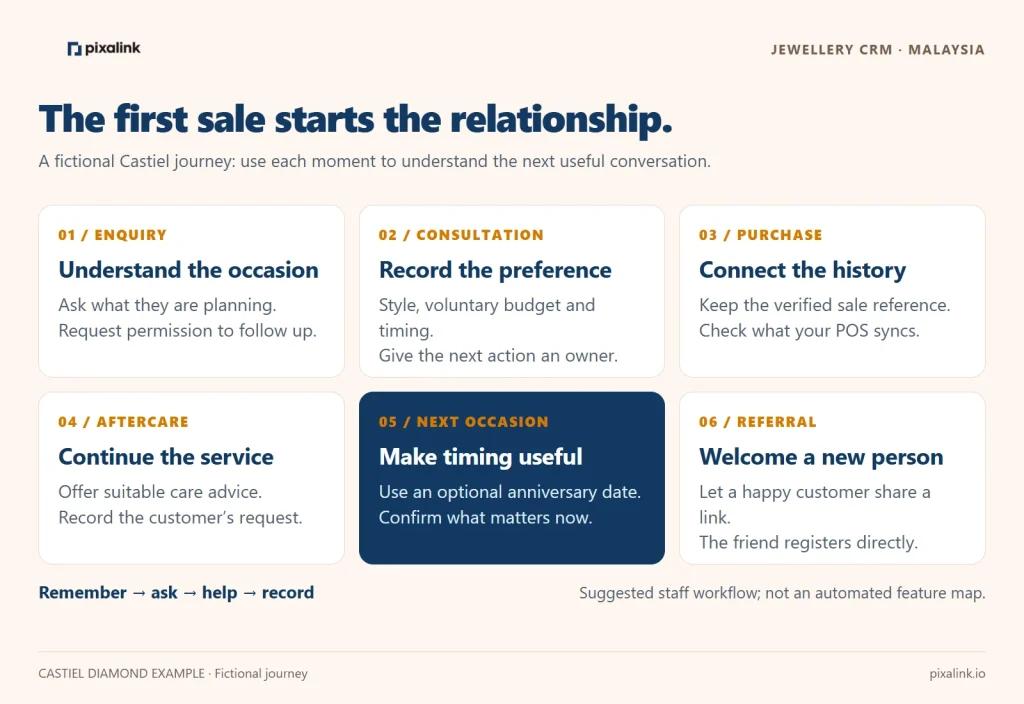
Jewellery usually has a different purchase rhythm from everyday retail. A wedding-band customer may go a long time between purchases and still value the shop. Track meaningful replies, appointments and service visits alongside purchases. Avoid labelling every customer who has not bought for 90 days as “lost”.
For a Malaysian kedai emas, the same approach can cover a customer’s interest in 916 bracelets, a preferred bangle size or an upcoming gifting occasion. Those are general gold-shop examples; they are not claims about Castiel’s product range.
What should a jewellery shop keep in its customer database?
Keep information that helps you serve the customer and that you have a legitimate reason to hold. A long form is not automatically a good form. Start with contact details, permission and one useful interest; add context naturally during the consultation.
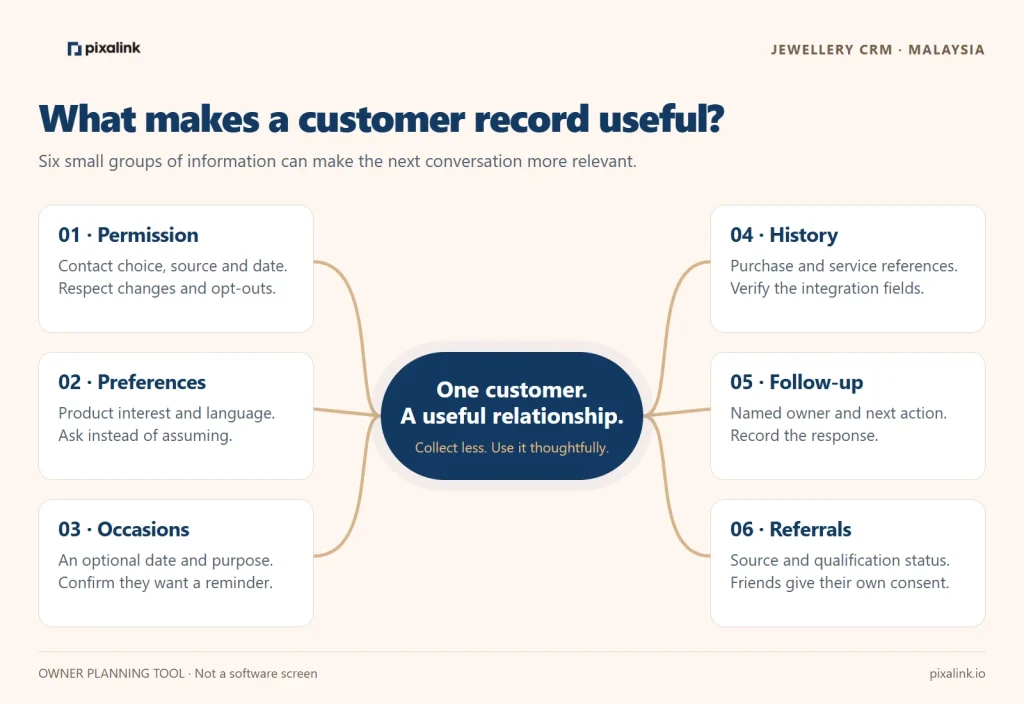
| Information | How it helps the shop | Practical boundary |
|---|---|---|
| Preferred name and contact number | Recognise the customer and reach the right person | Check spelling and the number; look for an existing record before adding another |
| Marketing choice, source and date | Know who agreed to which follow-up | Record the actual choice; a purchase alone is not a substitute for permission |
| Preferred language | Make the conversation comfortable | Ask; do not infer language from name or appearance |
| Product interest | Send a relevant selection or invitation | Use clear tags such as Wedding Bands or Anniversary Gift Interest |
| Optional occasion date | Plan a timely reminder | Ask whether the customer wants a reminder; do not invent a wedding date |
| Voluntary budget and style preference | Prepare a useful consultation | Treat a budget as current conversation context, not a permanent spending limit |
| Purchase or service reference | Continue the relationship accurately | Verify what your POS integration actually sends into Pixalink |
| Assigned staff member and next action | Make follow-up accountable | Keep an agreed staff workflow where a suitable system field is unavailable |
| Referral source and status | Understand introductions and eligibility | A friend should provide their own details and consent |
Turn a contact into a useful customer profile
Here is a made-up profile for Daniel. It is a staff planning worksheet, not a proposed or existing Pixalink dashboard.
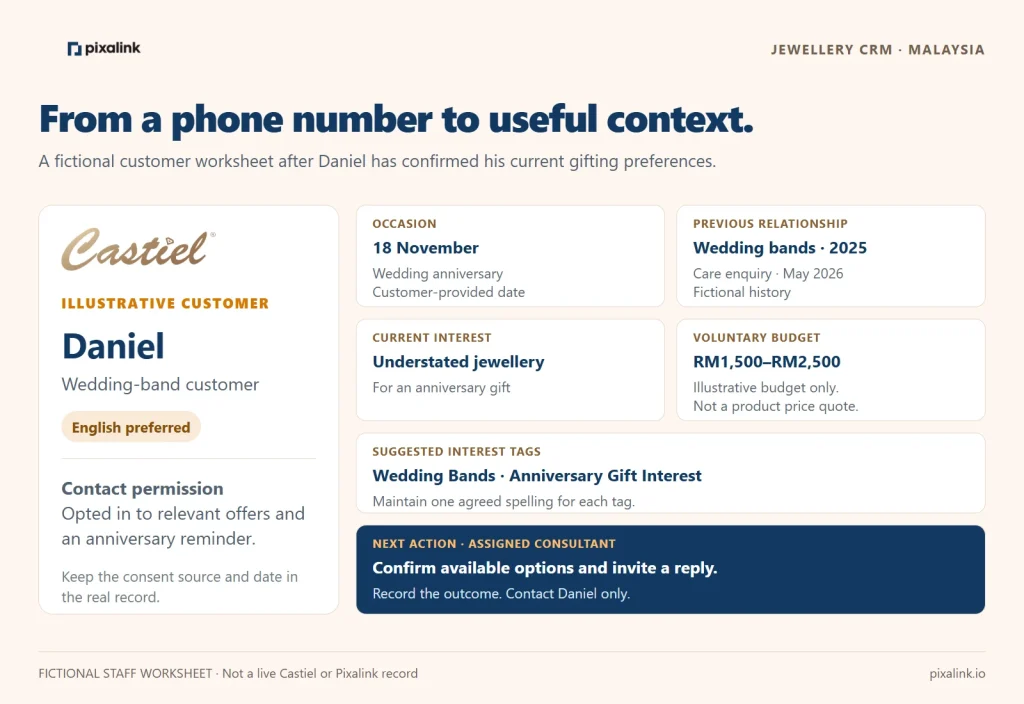
Before importing old spreadsheets, standardise phone formats, check duplicates and preserve consent history. Keep different records when two people share a household number unless you have established that they are the same person. Do not merge customers on name alone.
For tags, choose one spelling and stick to it. Pixalink tags are case-sensitive, so Wedding Bands and wedding bands can become separate groups. Assign someone to review new tags weekly. See Pixalink’s tag guide.
Campaign 1: Make the next anniversary easier to plan
An anniversary reminder works best when it offers help before the date. The useful message is often an invitation to discuss a budget and shortlist, rather than a general sale announcement.
In our fictional example, Daniel voluntarily recorded 18 November as his wedding anniversary and agreed to receive relevant messages. A reminder on 4 November 2026, 14 days before the date, gives him time to reply and discuss options. This is a suggested timing choice, not a guaranteed optimal interval.
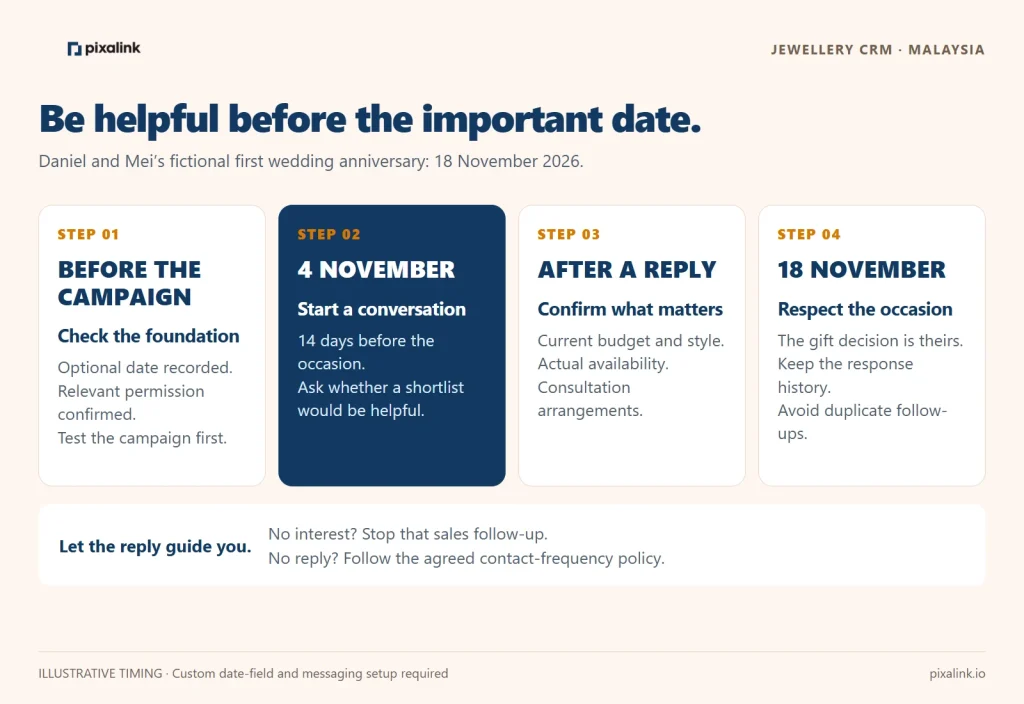
How to plan it in Pixalink
- Confirm that the account has an appropriate customer date field for the anniversary. Use the customer’s wedding anniversary, not the shop’s opening anniversary.
- In CRM → Campaigns → Create Templated Campaign, choose Custom Anniversary when that template is available. Select the configured date source and the advance-day setting.
- Review the audience, contact eligibility, channel and message. A reminder message and a reward are separate configuration decisions.
- Test with a staff-owned record and check the date, personalisation, channel and applicable message costs before using real contacts.
- Have a consultant respond. Confirm current budget, available pieces, lead times and appointment arrangements before making a promise.
The Custom Anniversary option depends on suitable anniversary-source fields being configured. Your available channels and account setup also matter. The workflow is supported by Pixalink’s campaign documentation; the Castiel example has not been configured or sent.
Example message — fictional Castiel campaign:
Hi Daniel, this is [consultant name] from Castiel Diamond. You asked us to remind you before your anniversary on 18 November. Would you like us to prepare a few gift ideas around your current budget? Reply here and we’ll help you explore the options. If you prefer no more marketing messages, let us know.
If he replies, “Something understated, around RM1,500–RM2,500,” update the context and prepare an appropriate selection from actual stock or feasible options. If the budget does not match available jewellery, say so clearly. Do not imply that the example budget buys a particular diamond piece.
If he does not reply, use your agreed contact-frequency policy. Do not let an automated reminder become several messages from different staff. If he declines, record the preference and stop that sales follow-up.

Campaign 2: Send an offer that matches the customer’s interest
A relevant offer can be a service, appointment or carefully selected product invitation. It does not always need to be a discount.
Someone comparing wedding bands has a different question from a customer browsing anniversary gifts. Keep those interests separate, then choose a useful next action for each group.
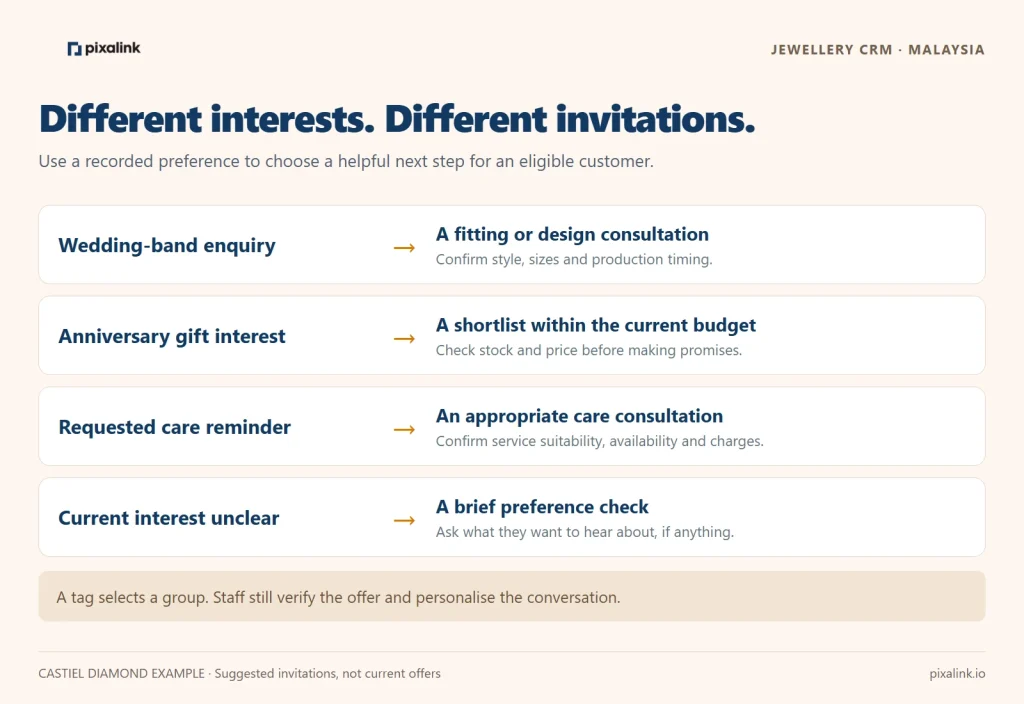
| Customer situation | Useful invitation | What staff should confirm |
|---|---|---|
| Wedding-band enquiry with permission to follow up | A fitting or design consultation | Timing, sizes, preferred style and current production lead time |
| Anniversary gift interest | A curated shortlist within the current budget | Available pieces and whether the customer wants to view them |
| Customer who requested a care reminder | An inspection or care consultation, if offered | Service scope, charges and suitability for the piece |
| Previous customer whose current interests are unclear | A brief preference check | Whether they still want messages and which topics interest them |
Use tags to choose the audience
In Settings → Tags, create a consistent label such as Wedding Bands. Apply it to the relevant customers through a verified manual, import or configured workflow, then use the appropriate filters for your communication. A tag records a grouping decision; it does not itself analyse a jewellery purchase or generate a personalised recommendation.
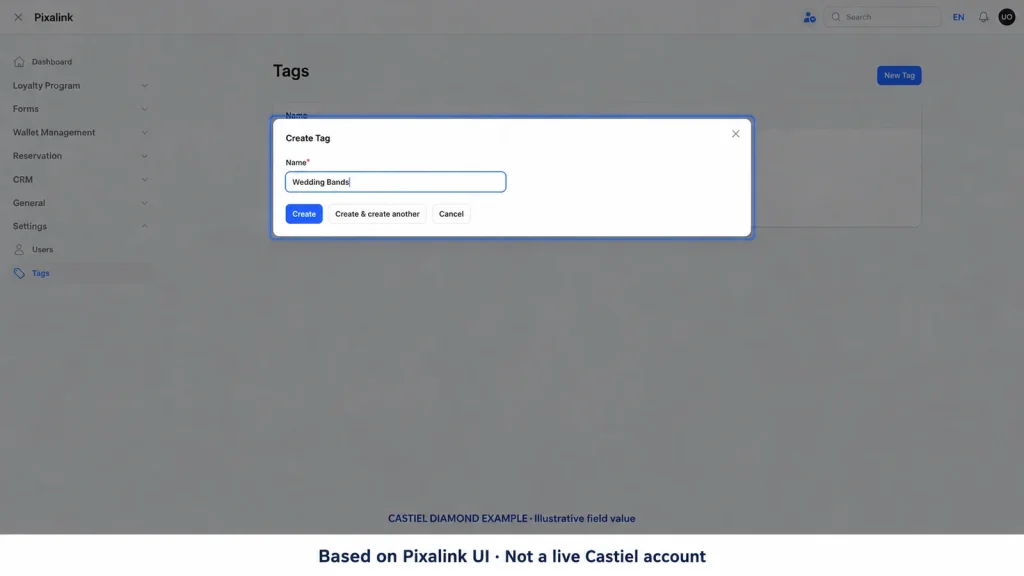
Do not assume a POS connection imports ring sizes, diamond details, product categories and service notes. Check the fields that actually sync, how returns are represented, and whether staff must add an interest manually. Keep gem certificates and detailed sales documents in the appropriate secure system; a marketing tag should not become a substitute for them.
Example message — fictional wedding-band follow-up:
Hi [first name], you recently asked about wedding bands at Castiel Diamond and agreed to a follow-up. Would you like a consultation to compare designs and discuss your preferred timing? Reply with a convenient day and our team will confirm availability.
For a general gold shop, a relevant offer could be a workmanship benefit on selected eligible items. Define the minimum spend, excluded items, validity, stacking rules and redemption method before promoting it. Avoid a blanket discount that unintentionally applies to the entire gold value.
Check the margin before launching an incentive
Suppose an eligible sale would contribute RM180 before the campaign incentive. Deduct an illustrative RM50 benefit, RM10 fulfilment cost and RM2 message cost allocation. The remaining contribution is RM118. These figures are teaching assumptions, not Castiel prices, costs or results.
Also count benefits given to customers who would have bought anyway. Revenue attributed to a campaign does not prove that every sale was caused by it. A small pilot with a comparable untreated group, where practical, gives a better indication of additional sales.
Keep aftercare in the customer journey
An aftercare conversation can be useful even when no purchase follows. Agree on the reminder during the sale or service visit and record the purpose. Before offering cleaning, polishing or inspection, confirm that the shop provides that service and that it is suitable for the specific jewellery.
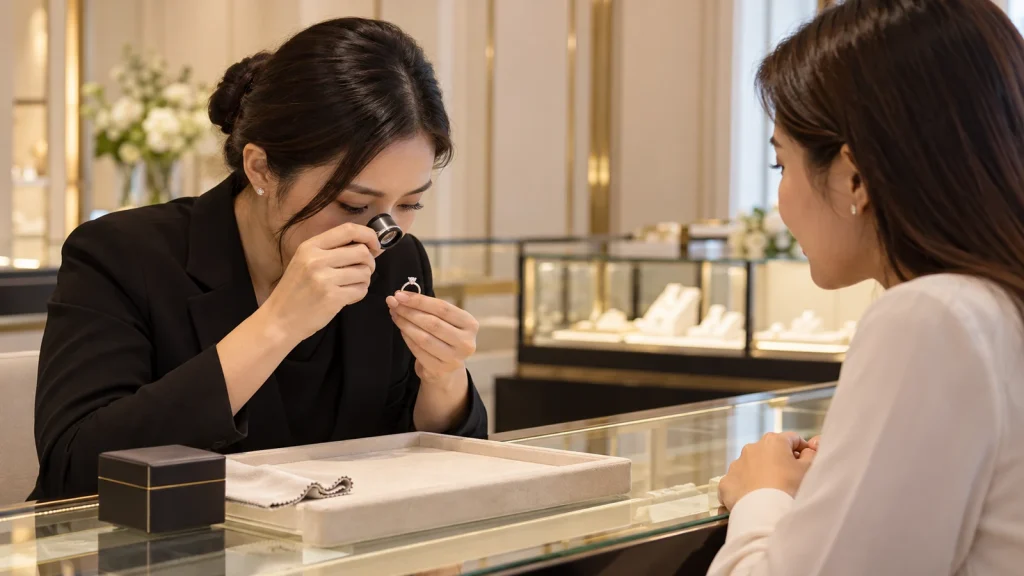
For Daniel, the next action might simply be: “Customer asked about ring care; consultant to explain appropriate options.” Record the outcome once the conversation happens. Avoid leaving an old reminder active after the customer has already visited.
This is where a database becomes valuable to the whole team. A colleague can continue the service conversation without asking the customer to repeat every detail. Keep staff access appropriate and avoid copying personal customer information into informal group chats.
Campaign 3: Turn a satisfied customer into a new introduction
Ask for a referral when the customer has a reason to recommend you. A completed fitting, a helpful consultation or a resolved service request is usually a better moment than repeatedly asking everyone in the database.
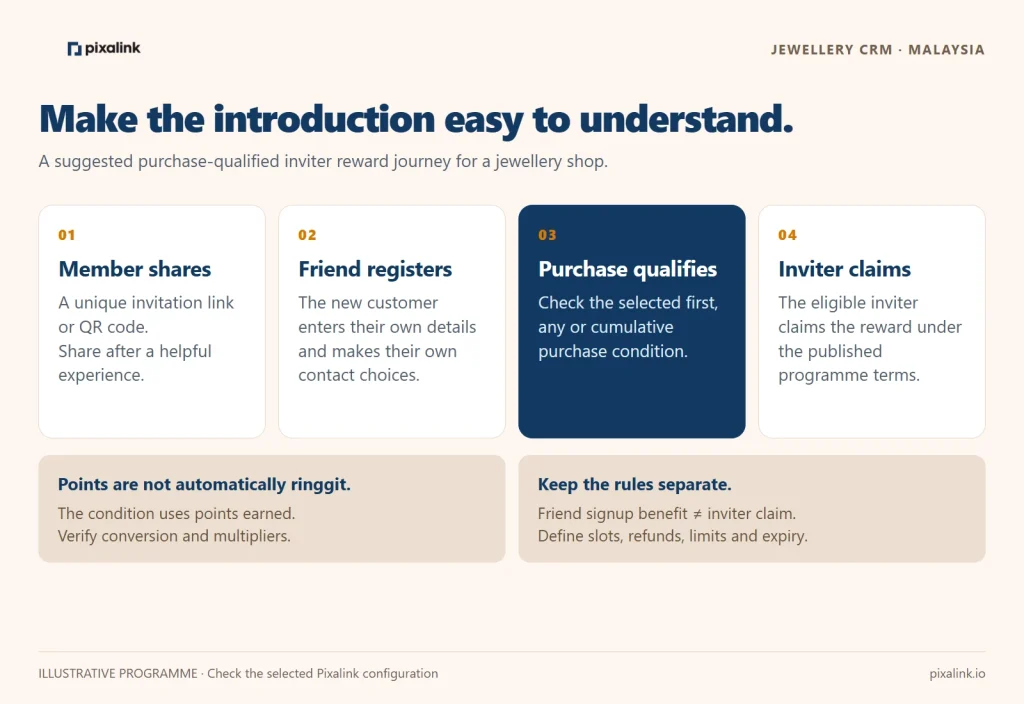
Imagine Daniel is pleased with his consultation and wants to introduce a friend. Give him a clear invitation link or QR code to share. The friend enters their own details and makes their own contact choices. Do not ask Daniel to upload a list of friends’ phone numbers.

Set referral rules that staff can explain
Pixalink documents referral rewards with claim conditions. A useful structure to evaluate is an inviter reward that becomes claimable when the referred friend meets a qualifying purchase condition. Choose the appropriate First Purchase, Any Purchase or Cumulative Purchases rule for your campaign.
Pay attention to the threshold: the documented condition uses points earned, not a direct ringgit amount. If your plan is based on a spend target, verify the points conversion, exclusions and any tier or outlet multipliers. A configuration reading “500 points” must not be advertised as “RM500 spend” without checking that the rules make them equivalent.
Also distinguish these behaviours:
- The friend’s signup reward can be separate from the inviter’s purchase-qualified reward. Do not assume both wait for a purchase.
- Under the documented conditional flow, the inviter must claim the eligible reward. Do not promise automatic crediting unless the selected configuration supports it.
- Referral slots and reward eligibility are separate controls. Explain limits and test what uses a slot.
- Establish rules for cancellations, refunds, self-referrals, duplicate accounts, expiry and staff exceptions. Do not assume every reversal is automatic.
See Pixalink’s referral claim-condition guide before configuring a live programme.
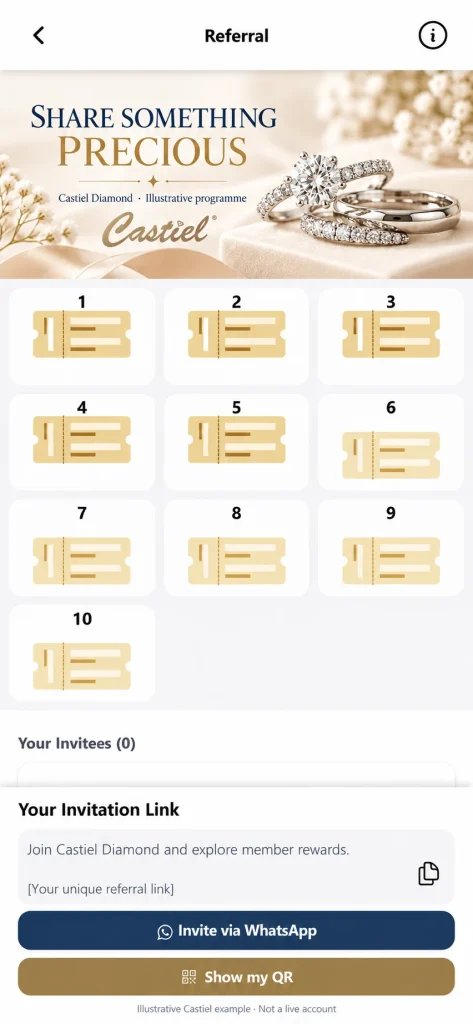
Example referral invitation — fictional campaign:
Know someone planning an engagement or looking for wedding bands? You can share your member invitation link with them. They can explore the programme and register for themselves. Any referral benefits follow the published eligibility and claim terms.
Keep the published terms close to the invitation. Explain exactly what happens at signup, after a qualifying purchase and when a reward is claimed. A clear programme is easier for customers to share and easier for staff to support.
Capture more customers without collecting unnecessary data
Make the invitation relevant to the situation. A visitor who asks about wedding bands may welcome a consultation follow-up. A buyer may want an optional care or occasion reminder. Someone who only wants to browse should be able to do that comfortably.
Useful places to introduce a permission-based signup include:
- A consultation desk, where staff explain what follow-up the visitor will receive.
- A receipt or jewellery-care card with a verified signup link or QR code.
- An in-store event, with a clear event-related signup and a separate marketing choice where appropriate.
- A member’s referral link, so the new customer registers directly.
For Malaysia, consider the customer’s preferred language and chosen occasions. Offer relevant festive communications when customers request them; do not infer religion or ethnicity from names and use it as a marketing shortcut.
Malaysia’s personal-data principles cover matters including consent, notice and choice, security, retention, accuracy and access. WhatsApp’s business policy also requires appropriate permission and respect for opt-outs. Build these into the signup and staff process. Malaysia’s Personal Data Protection Commissioner and WhatsApp Business Messaging Policy.
Pixalink’s documentation says Do Not Contact and Blocked customers are excluded from broadcasts. Make sure staff update contact preferences correctly. If a customer replies “STOP” or asks not to receive messages, process that request promptly; do not assume keyword automation is configured. See Pixalink’s broadcast eligibility guide.
A 30-day plan for a jewellery-shop owner
Start with one manageable audience and one reason to contact them. A clean pilot teaches more than a large broadcast with uncertain permissions and vague targeting.
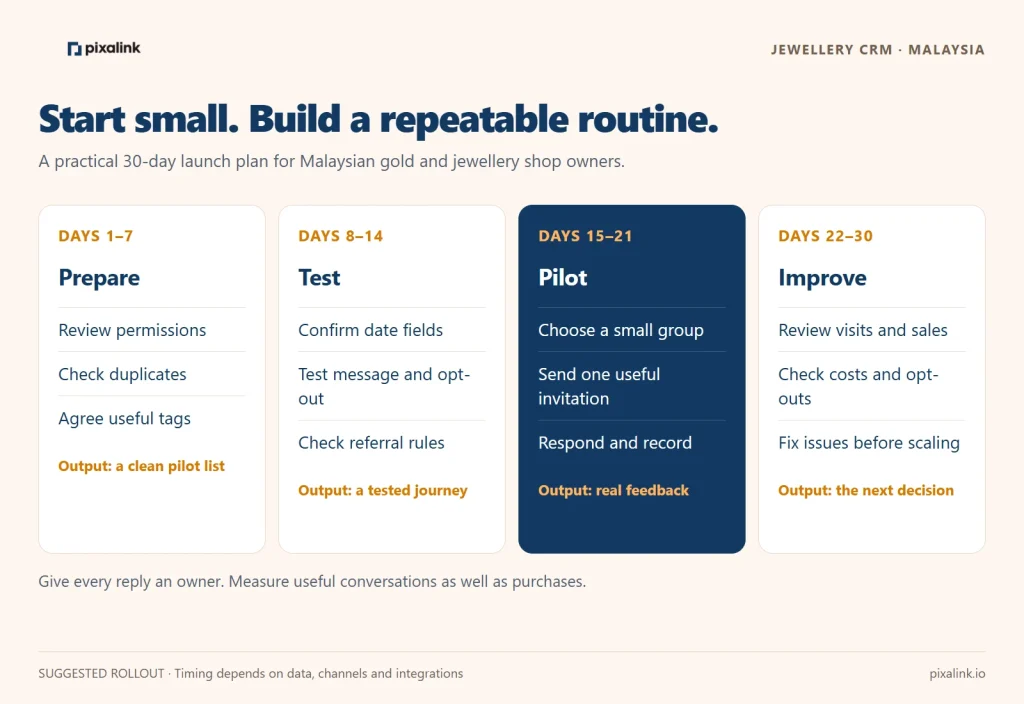
Days 1–7: prepare the data. Assign an owner, review permissions, remove clear duplicates safely and agree on a short tag list. Check what information is present and what is missing. Write down the fields staff should collect during a consultation.
Days 8–14: configure and test. Confirm available date fields, channels and integrations. Test the occasion reminder, audience filters, opt-out handling and referral conditions with staff-owned test records. Agree on offer terms and response ownership.
Days 15–21: run a small pilot. Choose a manageable eligible group. Send one useful invitation and respond to replies. Record appointments, visits and outcomes through a consistent process, even where a manual log is needed.
Days 22–30: review and improve. Compare effort, response quality, visits, purchases, incentive cost and opt-outs. Fix data or service problems before expanding the audience. Avoid increasing frequency merely because a campaign produced some replies.
What should the owner measure each week?
| Metric | Working definition | What it tells you |
|---|---|---|
| Permission coverage | Contacts with a usable, recorded permission basis ÷ contacts reviewed | How much of the reviewed database can appropriately receive the proposed message |
| Delivery rate | Delivered messages ÷ attempted messages, where channel reporting is available | Whether the communication is reaching eligible contacts |
| Reply rate | Unique recipients who reply ÷ delivered recipients | Whether the message starts a conversation |
| Appointment or visit rate | Unique contacted recipients with a recorded appointment or visit ÷ delivered recipients | Whether the next action is useful |
| Purchase conversion | Unique contacted recipients with a purchase in the stated attribution window ÷ delivered recipients | Purchases associated with the campaign, not proof of causation |
| Referral qualification rate | Referred new members meeting the condition ÷ referred new members in the same cohort | Whether introductions become eligible purchases |
| Contribution after incentives | Attributed contribution before incentives minus rewards, fulfilment and campaign costs | Whether the economics make sense |
| Opt-out rate | Unique recipients opting out ÷ delivered recipients | Whether relevance, consent or contact frequency needs attention |
Define the time window, use unique customers consistently and keep the denominator with the result. Use a reviewed report or manual reconciliation where Pixalink and the POS do not provide all the required data. This table describes a management scorecard, not a claim that every metric is a built-in dashboard tile.
What advantage is harder for another jewellery shop to copy?
Competitors can buy CRM software and run promotions too. Malaysian jewellers already offer loyalty programmes: Poh Kong describes member privileges and purchase records, while Diamond & Platinum promotes benefits that include birthday rewards and referrals. Poh Kong membership and D&P Rewards.
The stronger advantage is the relationship your team has earned: accurate preferences the customer chose to share, reliable follow-up, helpful service and staff who remember the previous conversation. Another shop cannot simply recreate that history by sending a cheaper offer.
For the fictional Castiel journey, that means recognising the wedding-band customer when an anniversary approaches, making the invitation relevant, and respecting the answer. Software supports the process. The team makes it worth returning.
Frequently asked questions
What is a CRM for a gold or jewellery shop?
A jewellery CRM helps a shop organise customer details, permissions, interests and follow-up. Used well, it connects an enquiry, purchase, service visit and future occasion so staff can communicate with useful context. It complements the sales and inventory systems rather than replacing their detailed records.
Can Pixalink send wedding-anniversary reminders?
Pixalink documents Custom Anniversary campaigns using configured date sources and advance-day settings. The account must have a suitable date field and messaging setup. Confirm the template, audience and channel in your account and test before launch.
What is a good offer for an existing jewellery customer?
Match the invitation to a known interest: a wedding-band consultation, anniversary-gift shortlist or appropriate care appointment. If using a monetary benefit, check the margin, eligible items, validity and redemption conditions before promoting it.
Can a jewellery referral reward depend on a purchase?
Pixalink documents purchase-related claim conditions for the inviter’s reward. The threshold is based on points earned, and the selected rule may use first, any or cumulative purchases. Friend signup benefits and inviter claiming must be reviewed separately.
Can an existing customer list be imported and messaged immediately?
First check duplicates, data accuracy and the permission basis for the proposed contact. Importing a phone number does not establish permission. Confirm the field mapping and channel requirements, then start with a tested eligible audience.
Does this article describe Castiel Diamond’s actual campaigns?
No. Castiel Diamond is used as a real client brand example. Customer stories, budgets, messages, programme rules and adapted UI visuals are fictional teaching examples. No Castiel campaign performance or live customer data is reported here.
See how Pixalink could fit your jewellery shop
Bring a sample of your field names, your current permission process and one customer journey to the discussion. You do not need to share a real customer list to explore the idea.
Ask Pixalink to demonstrate three things: an occasion reminder using a test date, an interest-based audience, and a referral journey with clear qualification and claiming rules. Then confirm your POS mapping, available channels, staff responsibilities and costs before launch.
Explore Pixalink’s loyalty programme software and customer portal, or request a jewellery-shop CRM demonstration.